Audit Trail & User Activity
An auditor's first question about a security tool is who did what in it. The platform answers from three records: the audit trail written for every authenticated request, the authentication event log written by the sign-in system itself, and the per-feature logs that some modules keep (API keys, Auto-Fix actions, DPDP). The platform administrator additionally gets a live User Activity view.
The audit trail
Every authenticated API request — which is every action in the UI — is written to the audit trail as one event:
| Field | Content |
|---|---|
| Who | User id, email, role, active team; or the API key's owner |
| What | HTTP method and path, and a classified action — user.login, user.logout, user.sso_login, mfa.setup / enable / disable / verify, scan.start / scan.view, report.generate / report.download, assessment.create / update, team.modify, user.modify, integration.*, api_key.*, and a generic <resource>.<verb> for the rest |
| When | Timestamp and how long the request took |
| Outcome | HTTP status and success / failure |
| Context | A summary of the request body for writes (first 500 characters) with sensitive fields — password, secret, token, mfa_token, session_id, API keys — replaced by ***REDACTED***; sign-in, registration, MFA and SSO exchanges log no body at all |
Health checks, live-event streams and documentation endpoints are not recorded. Events are retained 365 days by default (AUDIT_TRAIL_RETENTION_DAYS).
Who can read what
| Reader | Sees |
|---|---|
| Any member | Their own events in the active team |
| Team Admin | Every event in the active team, filterable by user |
| Platform administrator | Every event on the deployment, across teams |
GET /api/audit-trail?user_id=&action=&start_date=&end_date=&success_only=&limit=&skip= queries it (wildcards such as user.* work on action); GET /api/audit-trail/user/{user_id} narrows to a person; GET /api/audit-trail/actions lists the action vocabulary; GET /api/audit-trail/export streams CSV (up to 10,000 events — team Admin or platform administrator). There is no dedicated audit screen in the UI yet; the API and the CSV export are the way in.
Authentication events
Independently of the request trail, the sign-in system records login_success, login_failed, login_blocked (lockout), account_auto_unlocked, session_created, session_destroyed, session_expired and user_registered, with the IP address and user agent. These feed the platform administrator's login history below and GET /api/auth/audit-log (platform administrator).
Per-feature logs
- API keys —
GET /api/api-keys/audit-log: creation, rotation, revocation and requests blocked by scope, IP allowlist, expiry or rate limit;GET /api/api-keys/analyticsfor usage over 30 days. - Auto-Fix actions — approve / deny / execute / rollback with approver and reason, on each action — see Security Command Center.
- Compliance overrides and remediation — the remediation audit trail exported by Audit Reports.
- DPDP — the sealed audit pack in DPDP Compliance.
- AI agent decisions — the Command Center's Activity Log.
User Activity (platform administrator)
Where: left navigation → Management → User Activity (visible to the platform administrator only).
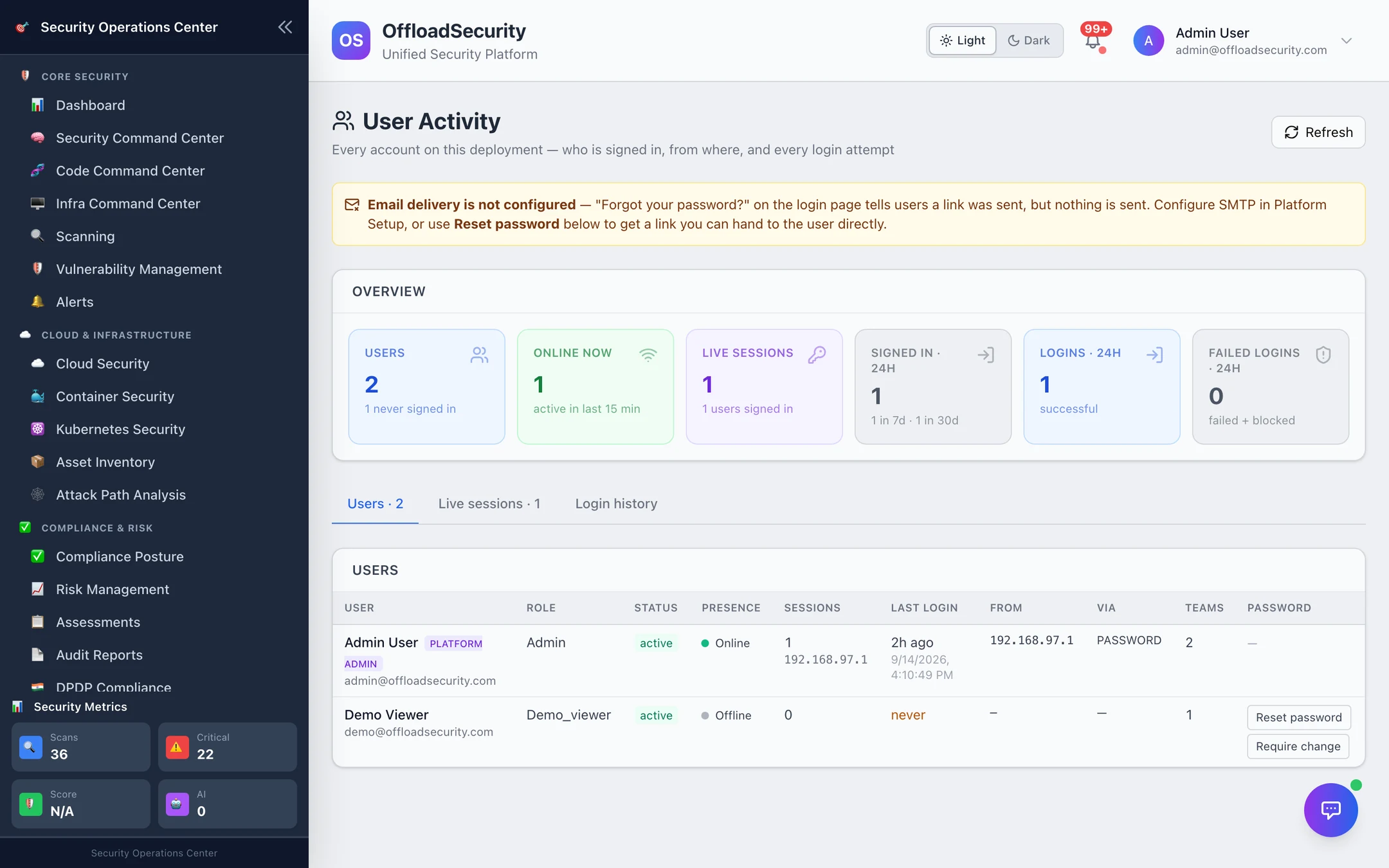
Every account on the deployment in one place — who is signed in right now, from where, and every login attempt:
| Tab | Shows |
|---|---|
| Users | Each account: role, status, presence (online = active in the last 15 minutes), open sessions, last login, source IP, sign-in method (password or SSO), teams, and the password actions below |
| Live sessions | Every open session — user, presence, IP, client, method, signed in, expires — with Sign out per session |
| Login history | Successful, failed and blocked sign-ins with IP and reason |
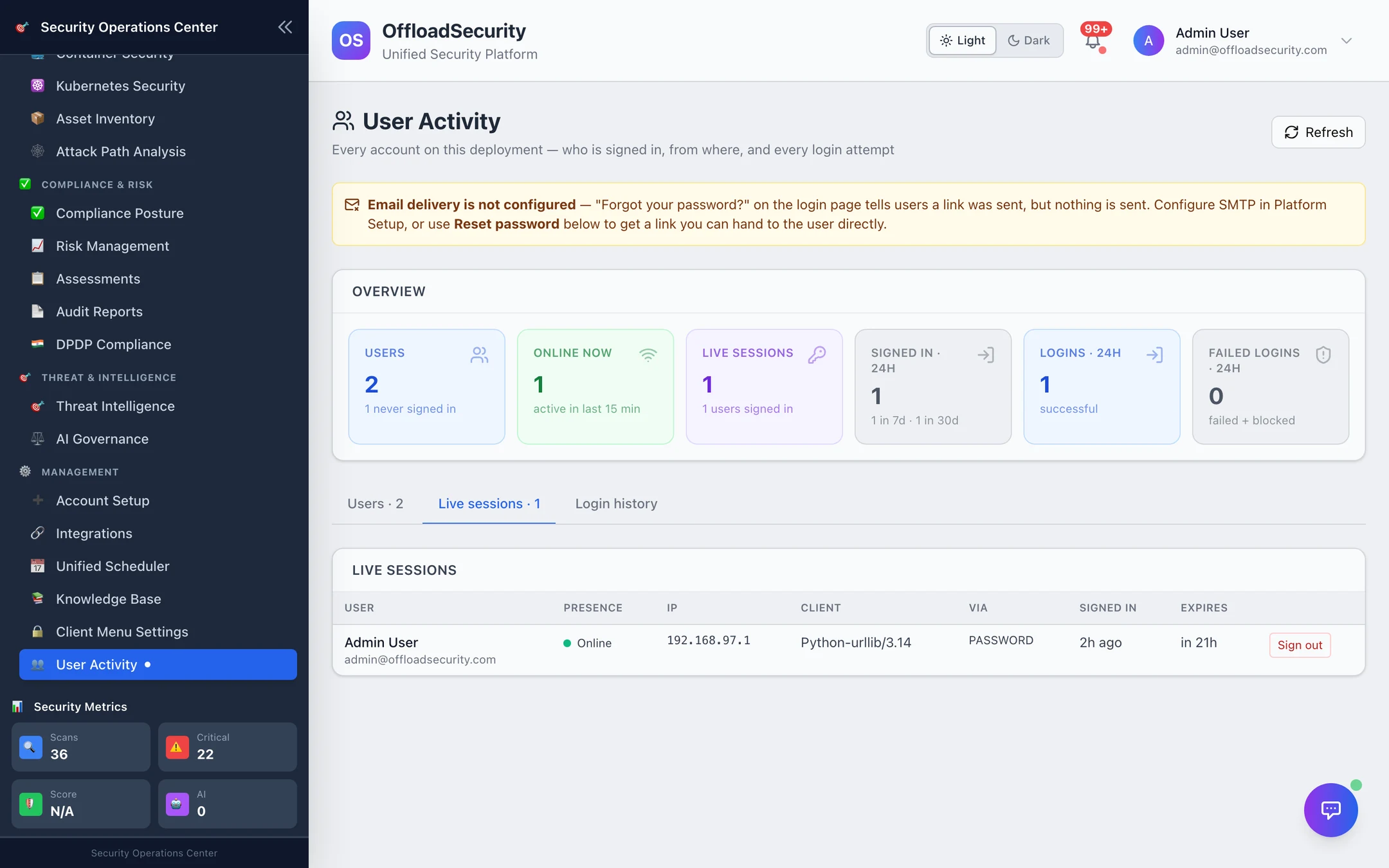
Two account actions live here because they are the administrator's answer when email is not configured: Reset password issues a reset link (valid 24 hours) to hand to the user directly, and Require change forces a new password at the next sign-in. The page says so itself when SMTP is missing.
Listing sessions here is read-only by design: opening the page does not refresh anyone's session or make them look active.
Related
- Signing In & Sessions — the events that produce the login history.
- Roles, Teams & API Keys — who is a team Admin.
- Platform Administration — the account that sees across teams.
- Platform Security API — the endpoints on this page.