Managing Connected Accounts
Once accounts are connected you manage them from two places that show the same accounts through different lenses:
| View | Where | Best for |
|---|---|---|
| Accounts tab | Cloud Security → Accounts | A card per account with last-scan time, live scan progress and one-click Quick / Full Scan. |
| Manage Accounts | Account Setup → Manage Accounts | The full table: search, filter by provider, edit regions, test connections, bulk actions, export. |
The Accounts tab
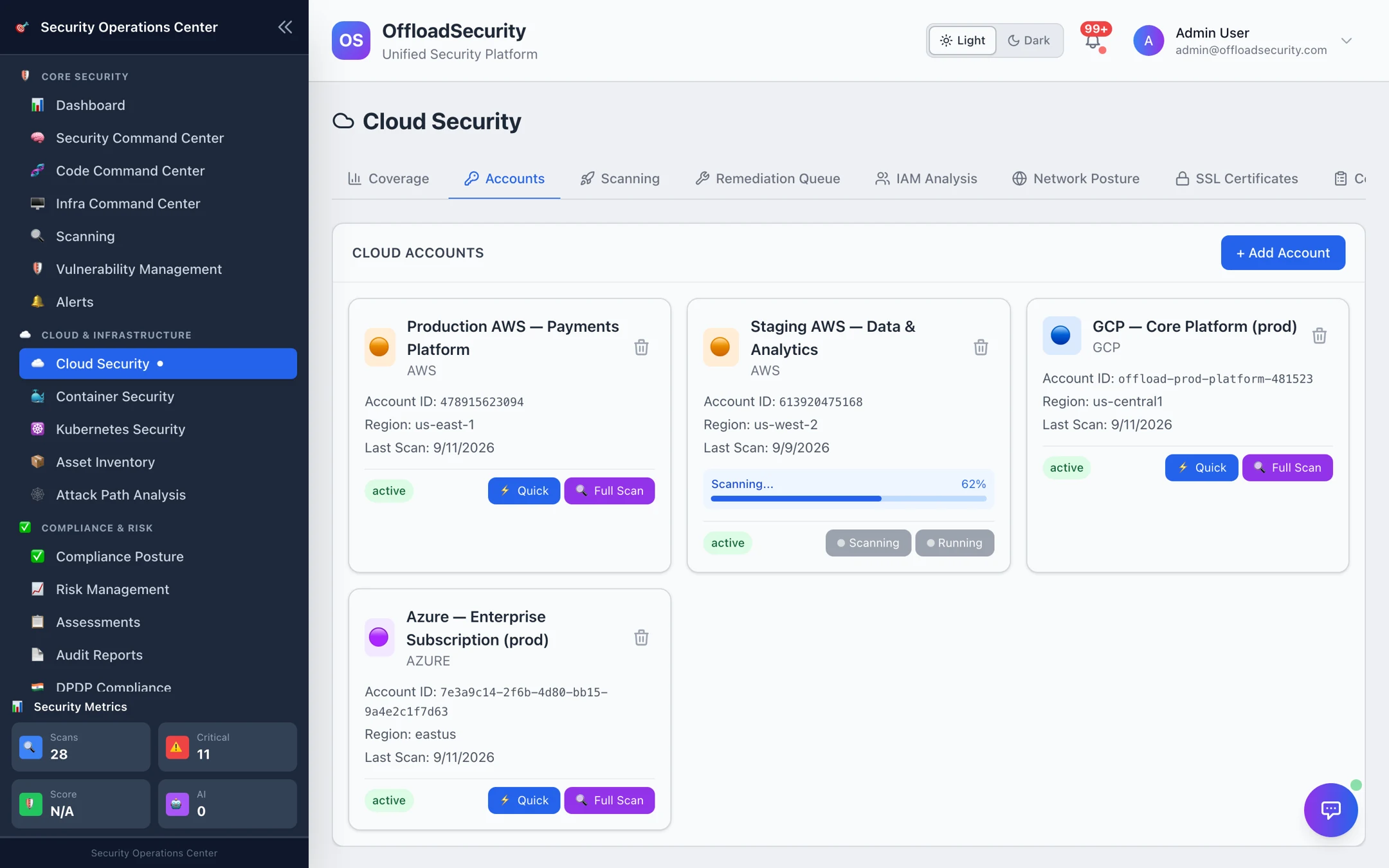
Each card shows the account's display name, provider, provider account ID, primary region, Last Scan date and a status badge (active, or error when the last connection check failed). While a scan is running the card shows Scanning… or Queued with a progress bar, and both scan buttons are disabled until it finishes — one scan per account at a time.
- Quick — a fast posture check of the primary region (AWS) or the whole project/subscription (GCP/Azure). Typically 5–10 minutes.
- Full Scan — the comprehensive run across all configured regions, all checks and all framework mappings. Typically 15–25 minutes on a large AWS account.
- The trash icon removes the account after a confirmation.
What each scan type covers is explained in Running Cloud Scans.
Manage Accounts
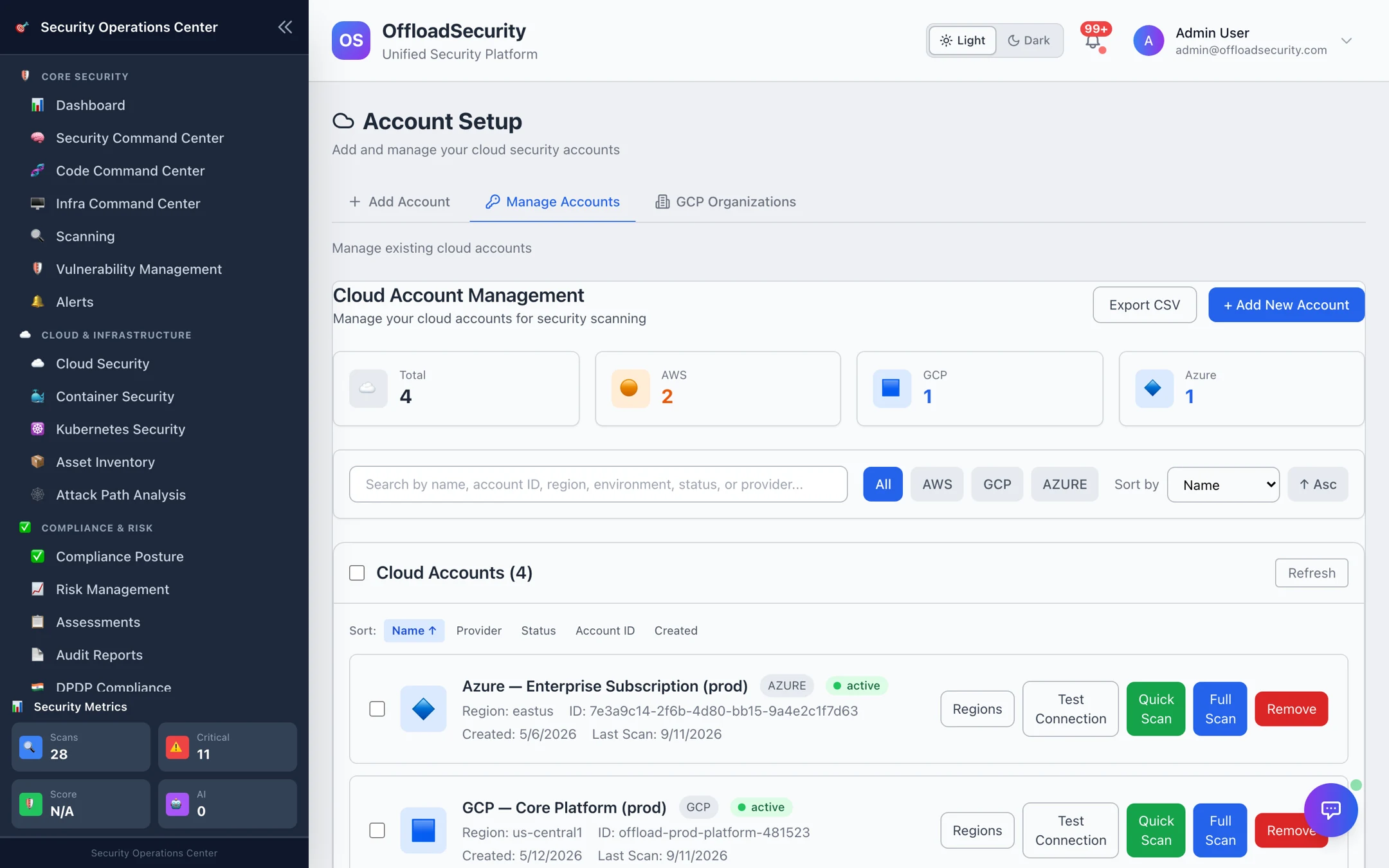
The header tiles count accounts per provider. Use the search box to match on name, account ID, region, environment, status or provider, narrow with the All / AWS / GCP / Azure filter, and sort by name or created date.
Per account row:
| Action | What it does |
|---|---|
| Regions | Opens the region picker so you can change which regions future scans cover. You can add a region ID that is not in the list. Applies to AWS; GCP and Azure always scan the whole project/subscription. |
| Test Connection | Re-runs the provider validation (the same check as onboarding step 6) and updates the account's status. Use it after rotating a key or changing the role's trust policy. |
| Quick Scan / Full Scan | Same as the Accounts tab buttons. |
| Remove | Deletes the account after confirmation — see Removing an account. |
Bulk actions
Tick the checkbox on several rows (or Select all) to act on them together:
- Test connections for every selected account — handy after an IAM change that touched many accounts.
- Scan every selected account (a full scan per account). Each still obeys the one-scan-per-account rule: the result reports which accounts were queued, which were already running, and which were skipped.
- Delete the selected accounts after a single confirmation.
Selections are limited to rows currently visible, so a filter change can never widen a bulk action beyond what you can see.
Export
Export CSV downloads the account list — useful as onboarding evidence for auditors ("these are the in-scope accounts").
Account status and health
| Status | Meaning | What to do |
|---|---|---|
| active | Last validation succeeded; scans can run. | Nothing. |
| pending / validating | Onboarding in progress. | Wait, or finish the wizard. |
| error | The last connection test or scan failed to authenticate. | Fix the role, key or API enablement, then Test Connection. |
| inactive | Deliberately disabled (for example a retired GCP project). | Re-enable from the GCP organization hierarchy or reconnect. |
| discovered | Found by organization discovery but not yet onboarded. | Toggle it on in the organization view. |
Credential age. The platform records when an account's credential was created and when it was last rotated. Credentials older than 60 days are flagged for rotation and 90 days as critical. After you rotate a key or secret in the cloud, supply the new value to the platform (update the account over the API, or remove and reconnect it) and run Test Connection.
Automatic pause after repeated failures. If a recurring scan fails three times in a row (for example the role was deleted), the platform pauses further scheduled scans for that account and records the reason, so a dead credential cannot generate a failing scan every night. A successful manual scan, or updating the credentials, clears the pause. Operators can change the threshold with CLOUD_SCAN_MAX_CONSECUTIVE_FAILURES.
Duplicate prevention
An account is identified by provider + provider account ID. Adding the same AWS account or GCP project twice under the same owner is rejected, so you cannot accidentally double-scan or split findings across two records. If two teams need the same account, connect it in each team — dashboards stay isolated per team.
Removing an account
Removing an account is a clean-up, not just a hide. The platform deletes the account record and then cascades:
- the account's findings, compliance scores and scan history,
- the matching entries in Vulnerability Management are closed,
- the account's recurring schedules are removed so nothing keeps firing.
If another team has the same provider account connected, the shared, provider-scoped data is kept for that team and only your account record and schedules go — the last team to remove it triggers the full cascade.
There is no undo for the deleted findings and scan history. If you only want to stop scanning for a while, pause the account's schedules in Unified Scheduler instead.
Related
- Connecting Cloud Accounts — the wizard and provider setup.
- Running Cloud Scans — quick vs full, regions, progress and status.
- Troubleshooting — connection errors and scans that will not start.