Real-Time Cloud Events
Scans tell you the state of an account every day. Cloud Events tells you the moment it changes. Your cloud pushes audit events to a platform webhook; the platform keeps the security-relevant ones, enriches them with who did what from where, raises a finding for each, and shows them on a live feed.
Where: Cloud Security → Cloud Events.
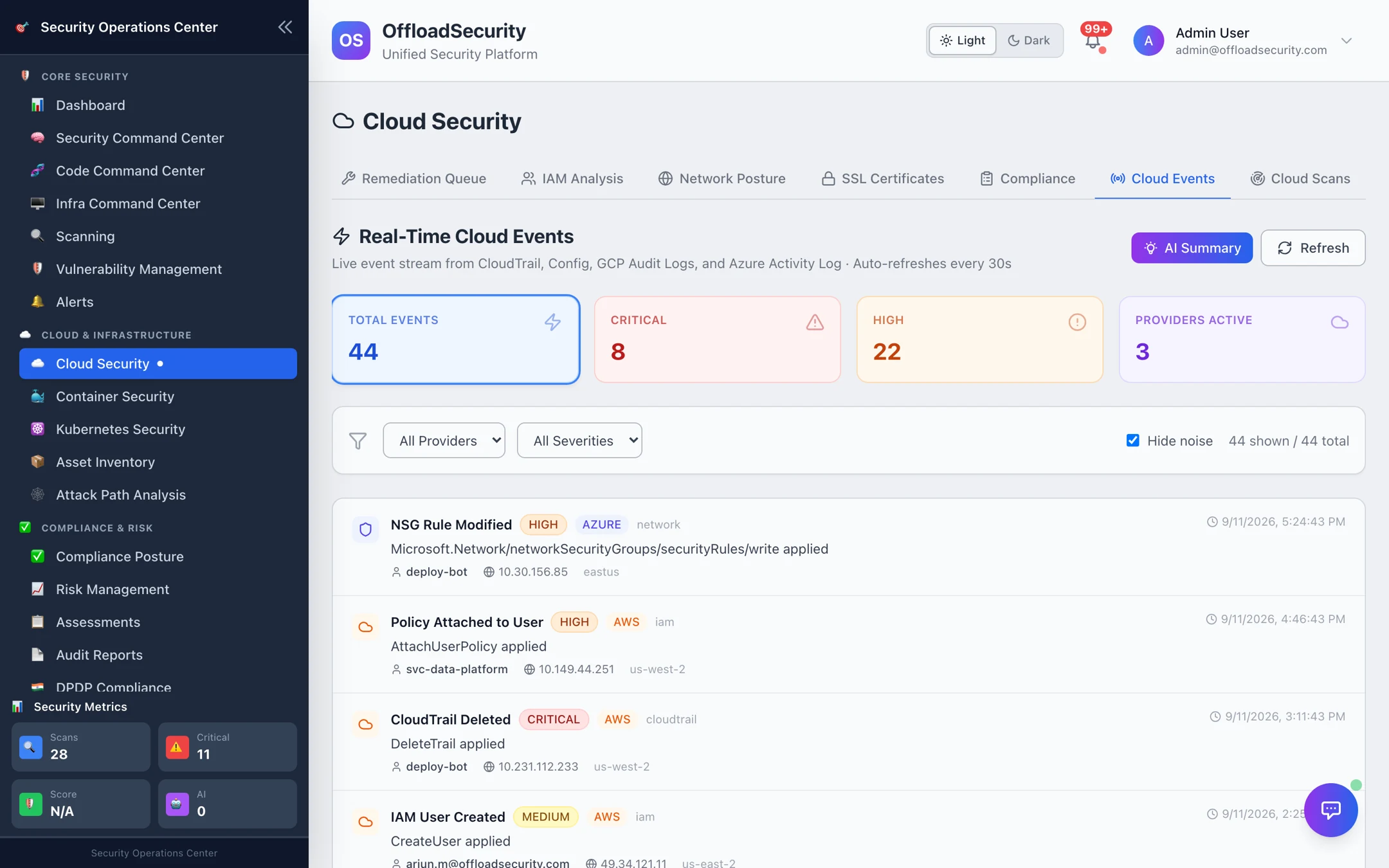
What you get
- Curated, not raw. Only events that matter for security are kept — roughly 270 AWS, 220 GCP and 155 Azure event types across identity, network, storage, logging, encryption, compute and database. Everything else is recorded as ignored, and failed API calls are skipped because they changed nothing.
- Enriched. Each event shows the actor / principal, source IP, user agent / client, service, region, account or project, the affected resource, the permissions involved and a plain-language What happened summary. The raw audit log is one click away.
- A finding per event. Each security-relevant event creates a real-time finding (severity from the event catalogue) next to your scan findings, so CloudTrail logging stopped or S3 bucket policy made public is triaged in the same place as everything else.
- Noise control. IAM policy changes that only touch provider service agents are marked as noise; Hide noise (on by default) keeps the feed readable while the events remain searchable.
Set up event delivery
Delivery is push-based: you create one event route in each cloud that targets the platform webhook. The scanning role needs no additional permission; the person creating the route needs the usual admin rights for EventBridge, Pub/Sub or Event Grid. The in-app Set Up Real-Time Cloud Events panel shows your instance's exact URLs.
| Cloud | Route | Webhook |
|---|---|---|
| AWS | CloudTrail → EventBridge rule → API destination (or an SNS topic pushing directly) | POST https://<your-host>/api/cloud-events/webhook/aws |
| GCP | Cloud Audit Logs → Logging sink → Pub/Sub topic → push subscription | POST https://<your-host>/api/cloud-events/webhook/gcp |
| Azure | Activity Log → Event Grid system topic → event subscription (webhook) | POST https://<your-host>/api/cloud-events/webhook/azure |
Authenticating the webhook
| Cloud | How the platform verifies the sender |
|---|---|
| AWS | EventBridge API destinations send a static API key; configure it as the x-amz-webhook-signature header (an Authorization header is also accepted). SNS pushes are verified with the SNS certificate chain. |
| GCP | Pub/Sub push with an OIDC token (Bearer) is verified when GCP_PUBSUB_OIDC_AUDIENCE is configured; alternatively an HMAC-SHA256 signature in x-goog-signature. |
| Azure | HMAC-SHA256 signature of the body in x-webhook-signature. Event Grid's subscription validation handshake is handled automatically. |
Secrets live in the platform's environment as WEBHOOK_SECRET_AWS, WEBHOOK_SECRET_GCP and WEBHOOK_SECRET_AZURE. With CSPM_CLOUD_EVENT_STRICT_AUTH=true (recommended for production) an unsigned request is rejected; leave it off only during initial wiring.
After wiring AWS, create and delete a tag on a test security group — AuthorizeSecurityGroupIngress/RevokeSecurityGroupIngress events show within seconds. On GCP, add and remove a viewer binding on a sandbox project; on Azure, change a tag on a resource group.
Reading the feed
The feed auto-refreshes every 30 seconds. Filter by provider and severity; the tiles show totals for the current window and how many providers are actively sending. Select an event for the full detail — identity, client, permissions, the change summary and the raw log.
Real-time findings carry a rt_ identifier and appear on the Scanning tab alongside scan findings; the next scheduled scan does not overwrite them.
Related
- Required Permissions — Bucket C — the one-time setup rights per cloud.
- Reviewing & Triaging Findings — where event-driven findings are worked.
- Notifications — routing critical events to Slack, Teams, email or a SIEM.