Identity & Network Posture
Two tabs on the Cloud Security page take the same scan results and present them the way an identity team and a network team actually think about them. Both work from findings you already have — no extra agents or permissions — and both offer deeper on-demand analyses that query the cloud live through the account's read-only credentials.
IAM Analysis
Where: Cloud Security → IAM Analysis.
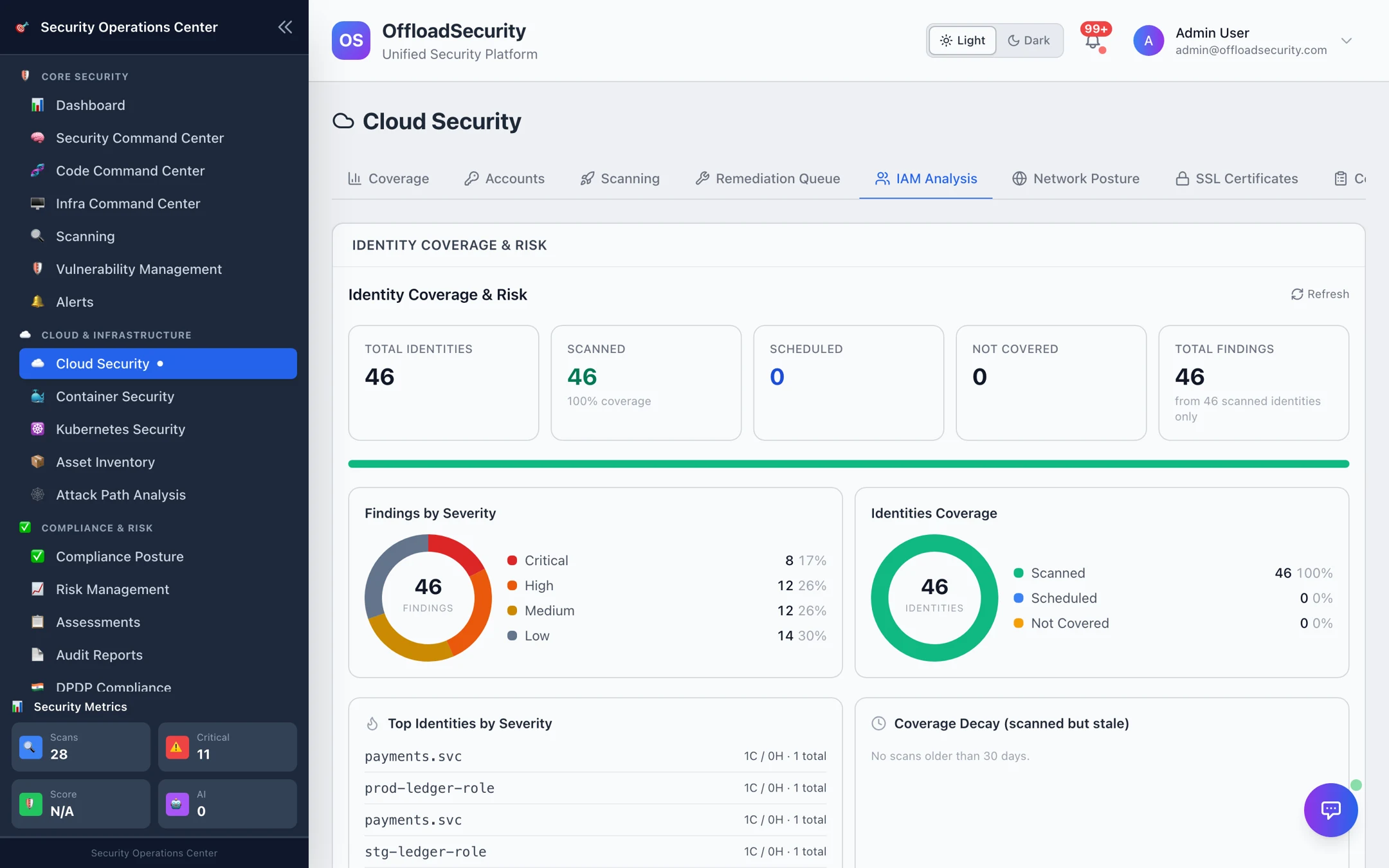
Identity Coverage & Risk
The header shows how many identities (IAM users and roles, GCP service accounts, Azure principals and managed identities) the platform knows about across your accounts, how many have a current privilege analysis (scanned), how many are scheduled, and how many are not covered. Below: findings by severity across identities, a coverage donut, the top identities by severity and coverage decay — identities whose analysis is older than 30 days.
An identity's severity collapses its analysis flags into one tier: critical when it holds admin-level rights, high when it is over-privileged, otherwise its assessed risk. Identities that have not been used for a long time surface here as dormant — the most common CIEM finding.
IAM Security Score and identity findings
Further down, the IAM Security Score (0–10) is computed from the density of open identity-category findings relative to the size of the account, so the score moves as you remediate and cannot read as perfect when nothing has been scanned. The identity findings list is the Scanning tab filtered to the IAM category — MFA, key age, unused credentials, directly attached policies, and so on — with an Export IAM findings as CSV action for the identity team.
Identity analysis actions
Pick an account and run one of three live analyses. They read your cloud; none of them changes anything.
| Action | What it does |
|---|---|
| Run IAM Analysis | Comprehensive privilege analysis: excessive permissions (privilege-escalation and broad data-plane actions), admin-access entities, cross-account trusts, unused users/roles/keys, access patterns, escalation paths and an overall IAM score with recommendations. Results are persisted so the identity roster and the attack graph pick them up. |
| Access Review | Generates an access-review report for the account — who has what — for periodic recertification. |
| Cleanup Unused | Lists unused IAM resources (users, roles, access keys) with their last activity, as a dry-run recommendation set. Nothing is deleted. |
Privilege analysis covers AWS IAM, GCP IAM policy bindings (primitive owner/editor roles and impersonation roles) and Azure role assignments. Very large accounts are analysed in bounded batches; the result flags when it was truncated.
Network Posture
Where: Cloud Security → Network Posture.
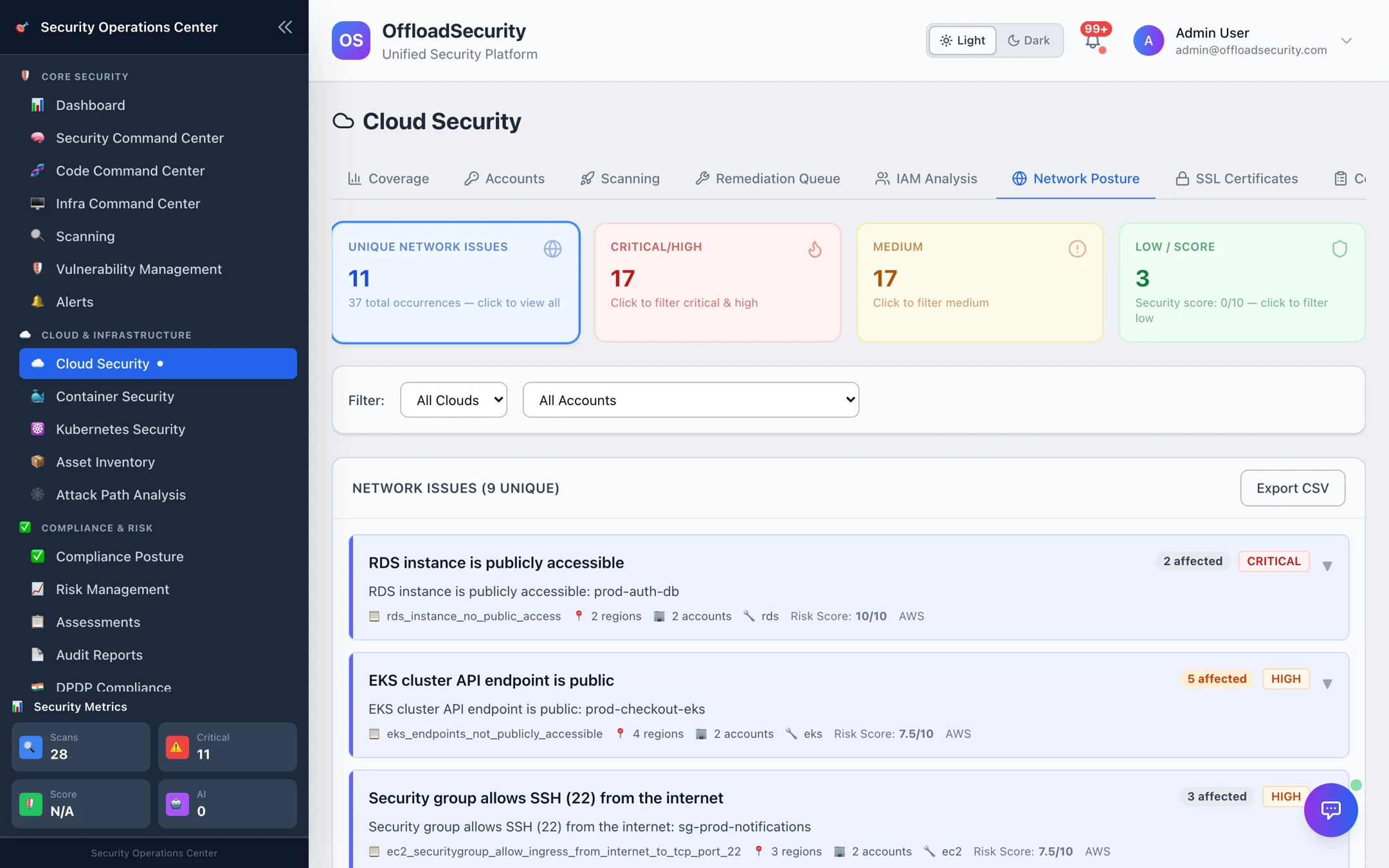
Network issues
The tab lists the unique network-category checks currently failing — public data stores, internet-open security groups and NSGs, public cluster endpoints, missing flow logs, HTTP listeners — each with the number of affected resources, regions and accounts, and its risk score. Filter by cloud and account; Export CSV hands the list to the network team. Each issue expands to the affected resources and console links exactly as on the Scanning tab.
Network analysis actions
| Action | What it does |
|---|---|
| Firewall Audit | Security-group / firewall-rule analysis for the selected account: overly permissive rules, unused groups, risky ports. |
| Public Exposure | Discovers internet-facing endpoints (public IPs, load balancers, exposed services) and classifies the high-risk ones. |
| Segmentation | Network topology discovery and segmentation assessment between VPCs / VNets / subnets. |
Results are summarised in a notification when the analysis finishes and feed the network findings list and the network posture score.
How to use these tabs
- Identity team: start with the top identities by severity — admin users without MFA and dormant service accounts are the fastest risk reduction available. Run IAM Analysis on your production account monthly; the roster's coverage decay tells you when it is due.
- Network team: filter Network Posture to Critical/High — public data stores first, then internet-open management ports (22/3389).
- Track fixes through the Remediation Queue and confirm on the next scan.
Related
- Reviewing & Triaging Findings — the underlying findings and actions.
- Attack Path Analysis — how identity and exposure combine into exploitable paths.
- Asset Inventory — public-facing and encryption summaries per asset.