Compliance & Benchmark Checks
Every cloud scan evaluates your configuration against hundreds of checks and reports each as pass or fail. A failing check becomes a finding; the pass/fail totals become compliance scores per framework, per account. This page explains what the checks cover and how to read the scores.
What the checks assess
- CIS Benchmarks. Each provider is evaluated against the CIS Foundations Benchmark — root/privileged accounts without MFA, public storage, open security groups, disabled audit logging, unencrypted data stores, and so on.
- Provider best practices. Beyond CIS: hardening recommended by AWS, Google and Microsoft across identity, network, storage, compute, logging and encryption — including the AWS Foundational Security Best Practices set.
- Framework mapping. Every check carries the control IDs it satisfies in each framework it maps to. That mapping is what turns a technical failure ("S3 bucket public") into an audit statement ("PCI DSS 4.0 req. 1.3.1 not met on 5 resources").
Checks are grouped into six categories you can filter on: IAM, Network, Storage, Compute, Logging, Encryption. Each failing check is rated Critical, High, Medium, Low or Informational and includes the remediation steps and a reference link.
The check engine is Prowler; the platform runs it read-only against your account, normalises the output, deduplicates it across runs, and keeps your triage decisions (see Reviewing & Triaging Findings).
Frameworks
| Framework | Where it appears |
|---|---|
| CIS Benchmarks (per provider version) | Finding filter, finding detail |
| PCI DSS 4.0, SOC 2, ISO 27001:2022, NIST 800-53 rev 5, NIST CSF 2.0 | Finding filter, finding detail, Compliance tab |
| HIPAA, GDPR, NIS2 | Finding detail, Compliance tab |
| RBI Cyber Security Framework, CISA, AWS Foundational Security Best Practices | Compliance tab |
| MITRE ATT&CK | Finding detail (technique tags) |
Availability depends on the provider: AWS has the broadest mapping (including NIST, HIPAA, GDPR, RBI, CISA and FSBP); GCP and Azure carry CIS, PCI DSS 4.0, ISO 27001, SOC 2 and MITRE ATT&CK, with NIS2 on Azure. Where a framework is not mapped for a provider the underlying checks still run — only the label is missing.
These are the technical controls. Compliance Posture combines them with policy, evidence and assessment controls from the Secure Controls Framework catalog to give you the full framework view — see Compliance Dashboard and Supported Frameworks.
The Compliance tab
Cloud Security → Compliance turns the pass/fail results into scores.
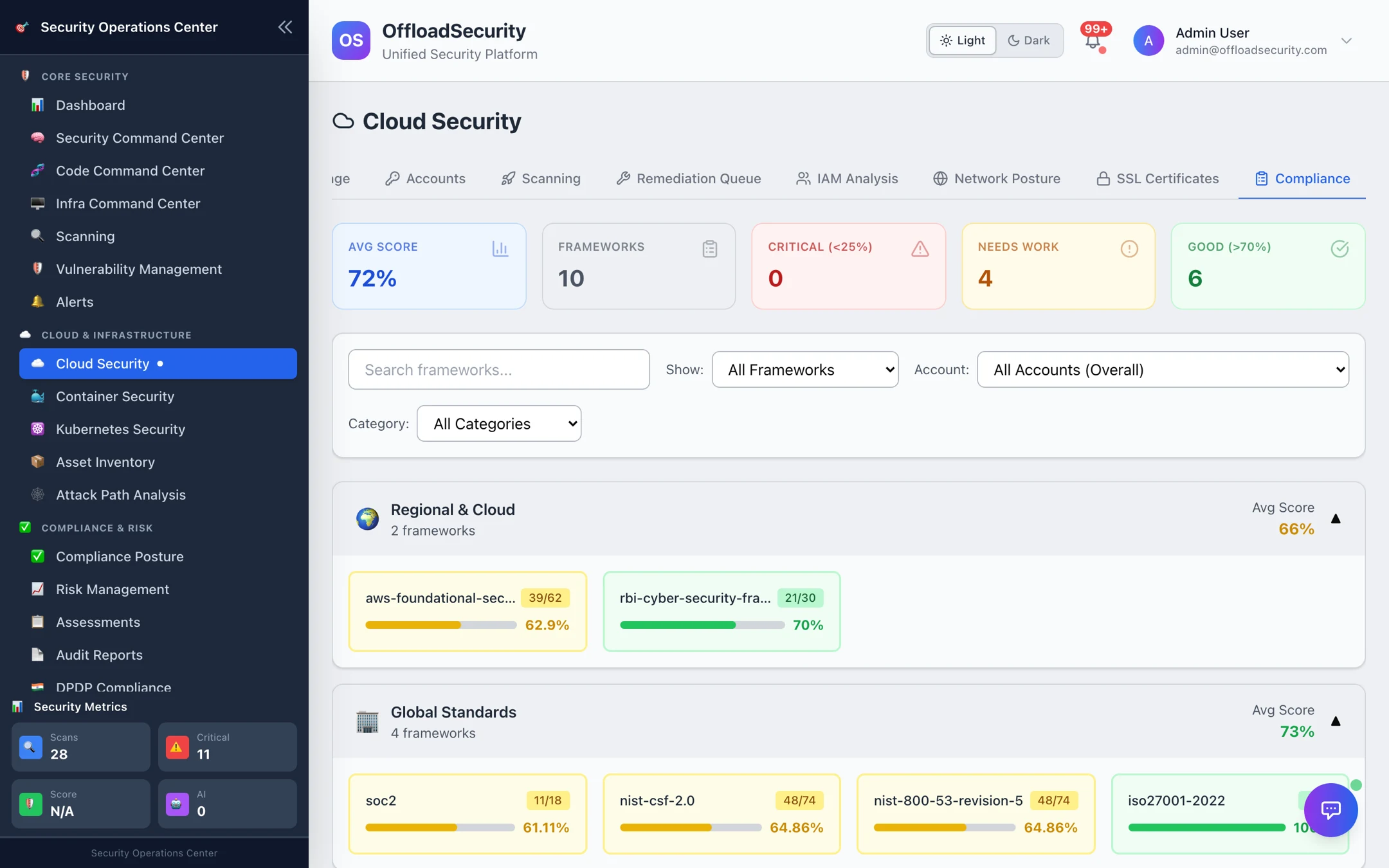
Score = passed checks ÷ total checks mapped to that framework, for the account(s) selected. The header tiles summarise the average score, the number of frameworks with data, and how many fall in each band:
| Band | Score | Read it as |
|---|---|---|
| Critical | below 25% | Systemic gap — usually logging, encryption or identity baselines missing across the account. |
| Needs work | 25–70% | Typical for a newly connected account. Work the Critical/High findings first; the score follows. |
| Good | above 70% | Baseline in place; remaining failures are individual resources. |
Frameworks are grouped into three tiers — Global Standards (SOC 2, ISO 27001, NIST CSF, NIST 800-53), Industry-Specific (PCI DSS, HIPAA, GDPR, NIS2) and Regional & Cloud (RBI, CISA, AWS FSBP). Use Account to score a single account, Show to focus on one framework, and Category to focus on one tier. Each framework card shows passed / total and the percentage.
Scores are recomputed from the latest finished scan of each account, so a fix that clears findings moves the score on the next run.
Using scores well
- Pick the framework you are accountable for — e.g. PCI DSS 4.0 for the payments account — and note its score per account.
- On the Scanning tab, filter Framework = PCI-DSS and Severity = Critical/High: that list is the shortest path to raising the score.
- Record accepted risks as suppressions with a reason so the auditor sees a decision, not an ignored failure.
- Re-run a Full scan before the review so the score reflects current state, then export findings (CSV/Excel) or generate a report.
A Full scan does not run more checks than a Quick scan — it covers more regions (see Scan types and regions). If a score looks too good, make sure the run covered every region you use.
Related
- Reviewing & Triaging Findings — filter by framework, resolve, suppress.
- Running Cloud Scans — keeping scores current.
- Compliance Dashboard — the organisation-wide framework view.