CI/CD & Automation
Scans you have to remember to run are scans that stop happening. The Automation tab keeps repositories on a schedule, and the CI/CD Pipeline generator produces the job that scans every build and fails it on your terms. For the per-change review with comments on the diff — GitHub, GitLab and Bitbucket — see Pull Request Review. The full REST contract, the GitHub Action, SARIF export and release-gate policy live in CLI & CI/CD; this page is the Code Command Center side of it.
Where: Code Command Center → Automation (and the Scheduled repository scans panel under New Scan).
Scheduled scans
Two schedule types keep coverage current without pipelines:
| Schedule | Set from | Cadence |
|---|---|---|
| Repository scans | New Scan → Scheduled repository scans → Schedule repository | Daily, Weekly (Mondays), Monthly (1st) — per repository, branch and scan type; Run once now to test |
| SBOM & licence scans | SBOM & Licenses → Scheduled SBOM & license scans | Same cadences; keeps licence and dependency intelligence fresh for repositories that do not change often |
The Overview's coverage tiles count scheduled repositories, and a repository with no push in 90 days is flagged stale so you can decide whether it still needs scanning. Schedules are also visible in the platform-wide Unified Scheduler.
Generate a pipeline
Where: Automation → CI/CD Pipeline.
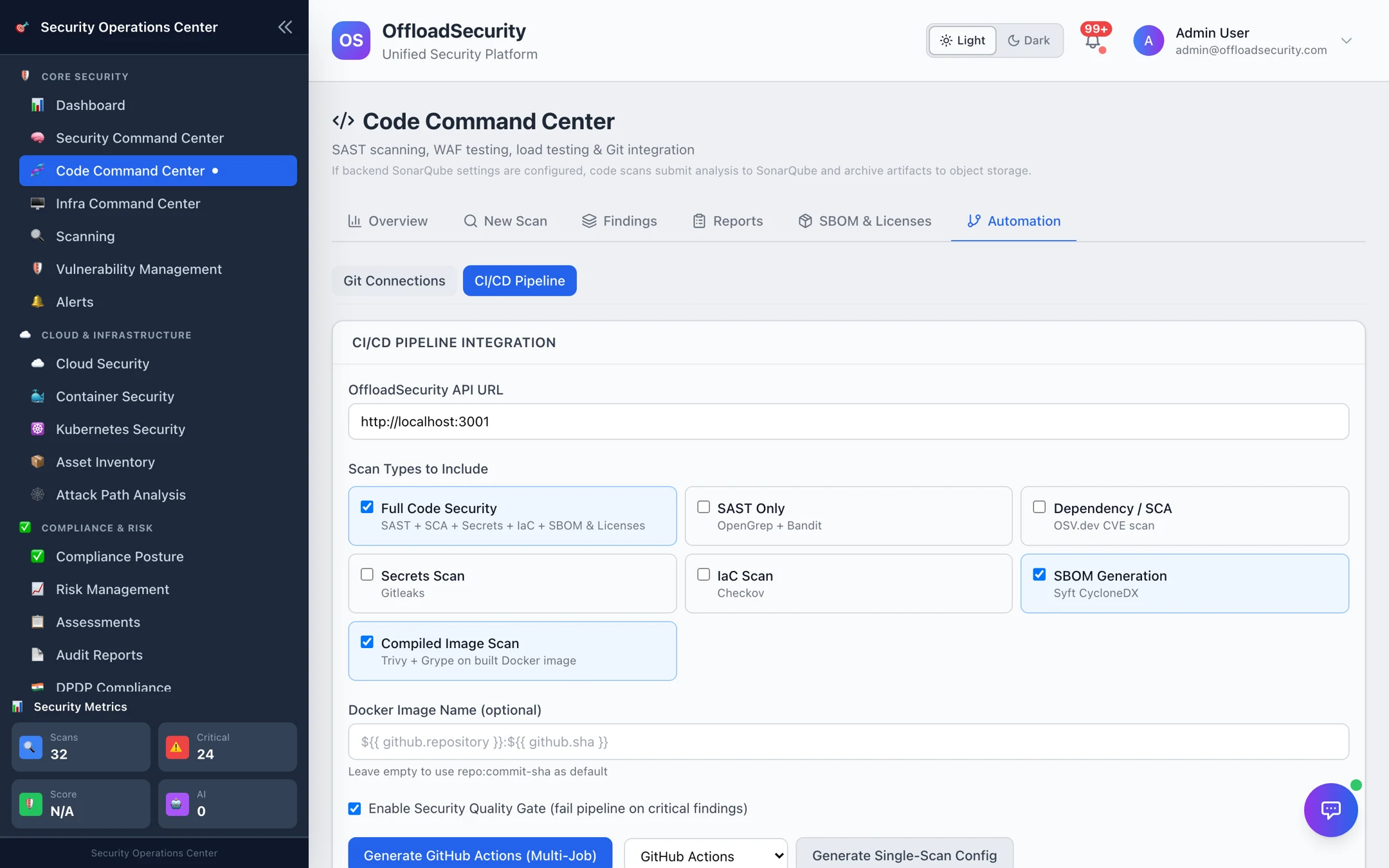
- Confirm the Offload Security API URL your runners can reach.
- Tick the scan types to run on each build; add the Docker image name (with
${{ github.sha }}or your CI's tag variable) to include a compiled-image scan. - Leave Enable Security Quality Gate on to fail the pipeline on critical findings.
- Choose the provider — GitHub Actions, GitLab CI, Bitbucket Pipelines, Azure DevOps or Jenkins — and Generate. Copy the YAML (or Jenkinsfile) into the repository, add
OFFLOAD_API_URLandOFFLOAD_API_KEYas CI secrets, and commit.
The generated job triggers the selected scans against the checked-out commit, polls until they finish, and exits non-zero when the gate fails. Generate GitHub Actions (multi-job) produces one parallel job per scan type; Single-Scan Config produces a compact single-step variant.
The API key
Pipelines authenticate with a CI/CD API key (X-API-Key). Create one under Settings → API Keys (also reachable from the Infra Command Center's GitHub Actions / Jenkins tabs), scope it to Run Scans + View Scans, and store it as a CI secret. Keys are per team; rotate them like any credential (API authentication).
Gating
| Gate | Where it is enforced |
|---|---|
| Severity threshold | The pipeline job fails when findings at or above the configured severity exist (fail_on_severity, default critical with the quality gate on). |
| SCA policy pack | Dependency and licence rules from the active policy pack — malicious packages, AGPL, fixable criticals, EPSS — decide block_release vs block_until_reviewed; each decision records the pack version. |
| Image admission policy | For compiled images, POST /api/container-security/cicd/scan-and-validate returns allowed and an exit_code (container gate). |
| Release-gate policy | Team-wide thresholds and history under /api/ci/gate — see Configure a release-gate policy. |
Findings from pipeline scans land in the same Findings and Reports tabs as manual scans, so a developer sees the exact finding that failed the job with its code context — and triage decisions (false positive, accepted risk) apply to the next build too. Every gate is decided from the scan's own findings; a pull-request check, a pipeline job and the release-gate policy all read the same result.
Run SAST + Secrets on every pull request (fast, blocks obvious mistakes) and the Full Code Security scan on merge to main and nightly. Dependency findings rarely need to block a feature PR, but they should block a release.
Related
- Pull Request Review — reviews on GitHub, GitLab and Bitbucket pull/merge requests.
- Pull Request Scanning — changed-files scans on every PR/MR with inline annotations and a required check.
- CLI & CI/CD — REST trigger/poll/results, the GitHub Action, SARIF, badges, PR comments, the GitHub App.
- Infra Command Center — the GitHub Actions and Jenkins setup guides with
scan.sh. - Scan Management & Scheduling — schedules for every scan type in one place.