Running Code Scans
Where: Code Command Center → New Scan.
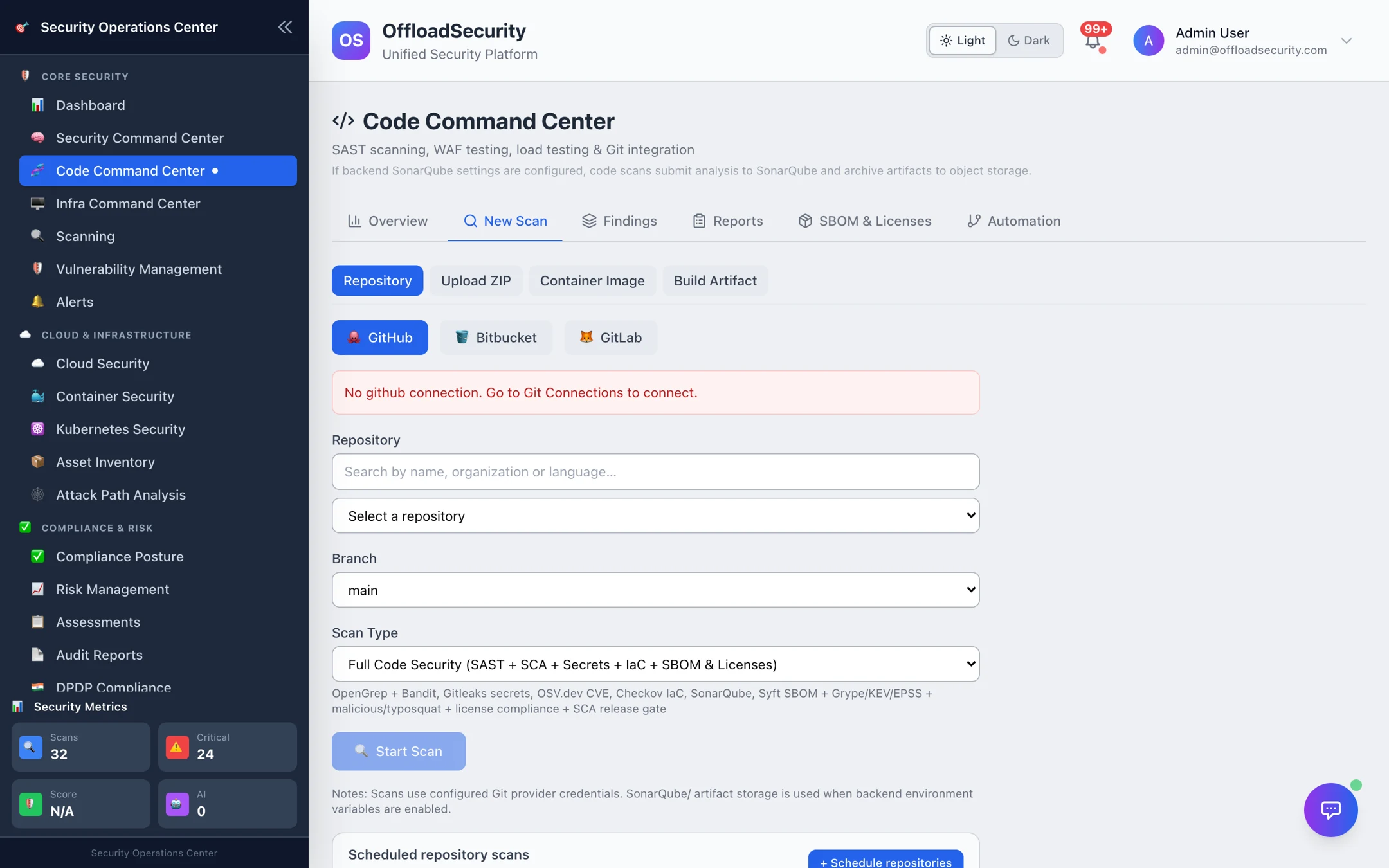
Choose a source
| Source | Give it | Needs |
|---|---|---|
| Repository | Provider (GitHub / Bitbucket / GitLab), repository, branch (default main) | A Git connection |
| Upload ZIP | A ZIP of the source tree (up to 500 MB) | Nothing — ideal for vendor code or air-gapped projects |
| Container Image | An image reference the platform can pull | Registry access for private images |
| Build Artifact | A .jar, .war, .ear, .whl, .egg, .tgz, .gem or .nupkg | Nothing |
Choose a scan type
| Scan type | Runs | When |
|---|---|---|
| Full Code Security (default) | SAST + SCA + Secrets + IaC + SBOM & Licences | Baseline scan of a repository; the scheduled weekly run. |
| SAST Only | OpenGrep + Bandit (and SonarQube when configured) | Fast feedback on code changes. |
| Dependency / SCA | OSV.dev CVE scan of every lockfile, enriched with KEV and EPSS | Daily; after a dependency bump. |
| Secrets Scan | Gitleaks over the source tree and the last 200 commits of history, each secret validated live against its provider | Before publishing a repository; after an incident. See Secret Detection. |
| IaC Scan | Checkov on Terraform, CloudFormation, Kubernetes manifests, Dockerfiles | Infrastructure repositories; before apply. |
| SBOM Generation | Syft CycloneDX + licence enrichment | Inventory and licence review — see SBOM & Licences. |
| Compiled Image Scan | Trivy + Grype on the built Docker image | After the pipeline builds; pairs with the container CI gate. |
Select Start Scan. The scan is queued immediately with a scan ID and runs in the background — clone or unpack, then each engine in turn. Progress shows the current phase (sast, opengrep, bandit, dependencies, secrets, iac, sbom, sonarqube) and a percentage; you can leave the page and pick the result up under Reports.
A typical small service completes in one to three minutes; large monorepos take longer, dominated by dependency resolution and SAST.
Repository scans use the team's Git connection; SonarQube results are attached when a SonarQube server is configured under Integrations. Nothing is written back to the repository by a scan — only the optional Fix PR action does that, and it is a separate, permissioned step.
What a scan produces
- Findings — one per issue, fingerprinted so re-scans update rather than duplicate: SAST findings carry file, line and code context; SCA findings carry package, installed and fixed versions, CVE, CVSS, EPSS and KEV; secrets carry the detector, location (values are masked), a live-validation badge and, for history-only leaks, the introducing commit; IaC findings carry the resource and the Checkov check. See Findings & Reports.
- Custom-rule results when a custom rules directory is mounted — the report records which rules were in force.
- A scan report with the per-tool breakdown, exportable as PDF.
- An SBOM (Full or SBOM scans) with licence data, listed under SBOM & Licences.
- Coverage — the repository is now scanned on the Overview; put it on a schedule so it does not turn stale.
Scheduled repository scans
Below the form, Scheduled repository scans lists the repositories on a recurring schedule and lets you add one: repository, branch, scan type and cadence — Daily, Weekly (Mondays) or Monthly (1st) — with Run once now to test. Scheduled SBOM & licence scans are configured the same way on the SBOM tab. Details and pipeline integration in CI/CD & Automation.
Related
- Findings & Reports — triage what the scan found.
- CI/CD & Automation — run the same scans from GitHub Actions, GitLab CI or Jenkins.
- Scanning API —
POST /api/code/scan,POST /api/code/upload-scan,GET /api/code/scan-status/{scan_id}.