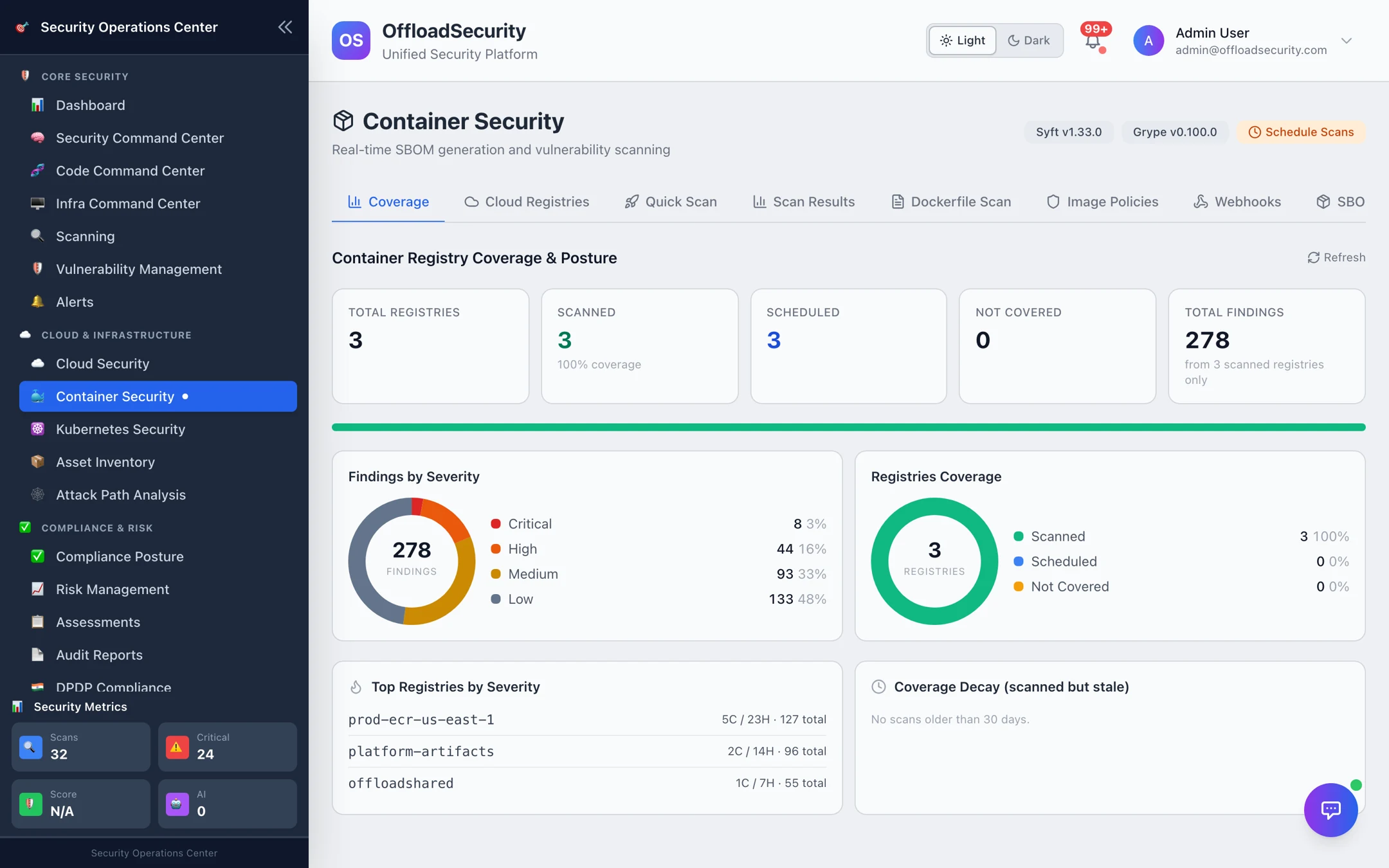
Container Security
Container Security scans the images behind your workloads for vulnerabilities, leaked secrets, misconfigurations, and unverified signatures — and gives you a complete software bill of materials (SBOM) for every image. You can scan a single image on demand, connect a registry to browse and scan everything in it, or have new images scanned automatically the moment they're pushed.

What it does
- Scans images from any registry. Connect Amazon ECR, Google Artifact Registry (GCR), Azure Container Registry (ACR), or Docker Hub to discover and scan your repositories. You can also scan any public or one-off image by name (for example,
nginx:latest) without connecting anything. - Finds known vulnerabilities (CVEs). Each scan reports OS-package and language-dependency CVEs with severity, the affected package and version, and the fixed version when one is available — plus an overall risk score.
- Generates an SBOM. Every full scan produces a complete package inventory you can review in-app or export in industry-standard formats (Syft JSON and CycloneDX).
- Detects secrets and misconfigurations. A full analysis also surfaces secrets baked into image layers and image misconfigurations, alongside the CVE results.
- Checks Dockerfiles. Paste a Dockerfile to scan it for security misconfigurations and CIS Docker Benchmark best-practice violations, with a letter-grade summary.
- Enforces image policies. Define rules (maximum critical/high vulnerabilities, maximum image age, signature required) and validate any image against them — useful as a release gate.
- Verifies signatures. Policies can require that images be signed, so unsigned images fail validation.
- Automates scanning with webhooks. Trigger a scan automatically whenever a new image is pushed to a connected registry.
How to use it
Open Container Security from the left navigation. The module is organized into tabs across the top: Cloud Registries, Quick Scan, Scan Results, Dockerfile Scan, Image Policies, Webhooks, SBOM, and Compliance.
Scan a single image (Quick Scan)
Use this for a public image or one that isn't onboarded through a registry.
- Go to the Quick Scan tab.
- Enter a container image name (for example,
nginx:latest,alpine:3.18, orredis:7.2). You can also click one of the suggested popular images. - Choose a Scan Type:
- Vulnerabilities — scan for CVEs only.
- Full Analysis — vulnerabilities plus SBOM, secrets, and misconfigurations.
- Select Start Security Scan. When the scan finishes you're taken to Scan Results with the new scan expanded.
Connect a registry and scan its images
- Go to the Cloud Registries tab and add a registry. You can link an existing connected cloud account (for ECR, GCR, or ACR) or enter credentials directly (a username and access token for Docker Hub).
- Browse the discovered repositories. The list supports pagination, search, scan-status filters, and per-image vulnerability badges so you can spot risky images at a glance.
- Scan an image directly from the repository list, or open it to view its latest results.
:::tip Reuse your cloud connections If you've already connected an AWS, GCP, or Azure account for cloud posture scanning, the platform can discover your ECR, Artifact Registry, and ACR repositories from it — no separate credentials needed. See Connecting Cloud Accounts. :::
Read the results
In the Scan Results tab, each scan shows the image name, scan type, and a summary of vulnerabilities found. Select View Details to expand a scan and review:
- Vulnerability Summary — counts by severity (Critical, High, Medium, Low, Negligible) and the total, plus an overall Risk Score out of 100 and a risk level.
- Top Vulnerabilities — the most significant CVEs, each with the affected package and version and the fixed version when available. Select Explain with AI on any finding for a plain-language explanation.
- Software Bill of Materials — total package count, a breakdown by package type, and a searchable package inventory.
- Recommendations — suggested remediation actions for the image.
Use JSON, CSV, or SBOM to export the results, or AI Summary for an at-a-glance overview of the whole scan. The full vulnerability list is always available in the JSON export.
Scan a Dockerfile
- Go to the Dockerfile Scan tab.
- Paste your Dockerfile content.
- Select Scan Dockerfile. You'll get a letter grade and a list of findings covering security misconfigurations, CIS Docker Benchmark checks, and best practices (for example, running as root or storing secrets in
ENV).
Define and apply image policies
- Go to the Image Policies tab.
- Create a policy (or start from a template) with rules such as maximum critical vulnerabilities, maximum high vulnerabilities, maximum image age, and signature required.
- Use Validate Image to check a specific image against a policy and see whether it passes or fails — handy as a quality gate before promoting an image.
Generate a standalone SBOM
The SBOM tab manages software bills of materials with their own status tracking. Enter an image name, choose an output format (Syft JSON or CycloneDX), and generate it. Generated SBOMs are listed so you can view, export, or delete them later.
Automate scanning on push (Webhooks)
- Go to the Webhooks tab and configure a webhook for a registry type (ECR, GCR, ACR, or Docker Hub).
- Enable auto-scan on push and optionally set a severity filter.
- The platform gives you a callback URL to register with your registry. New images are then scanned automatically as they're pushed. You can enable, disable, or delete webhooks at any time.
Track compliance posture
The Compliance tab generates container compliance reports (for example, against the CIS Docker Benchmark) for a target and shows your posture trend over time.
:::note Prerequisites To scan images in a private registry, connect the registry first (or connect the underlying cloud account). Quick Scan works without any connection for public images. :::
:::tip Catch issues earlier Pair Webhooks with an Image Policy so every newly pushed image is scanned and gated automatically — failing risky images before they reach production. :::
Related
- Connecting Cloud Accounts — connect AWS, GCP, or Azure to auto-discover your registries.
- Kubernetes Security — scan the clusters that run your containers.
- API & Code Security Scanning — SAST, dependency, and SBOM scanning for your source code.
- Vulnerability Management — triage and track container findings to remediation.